

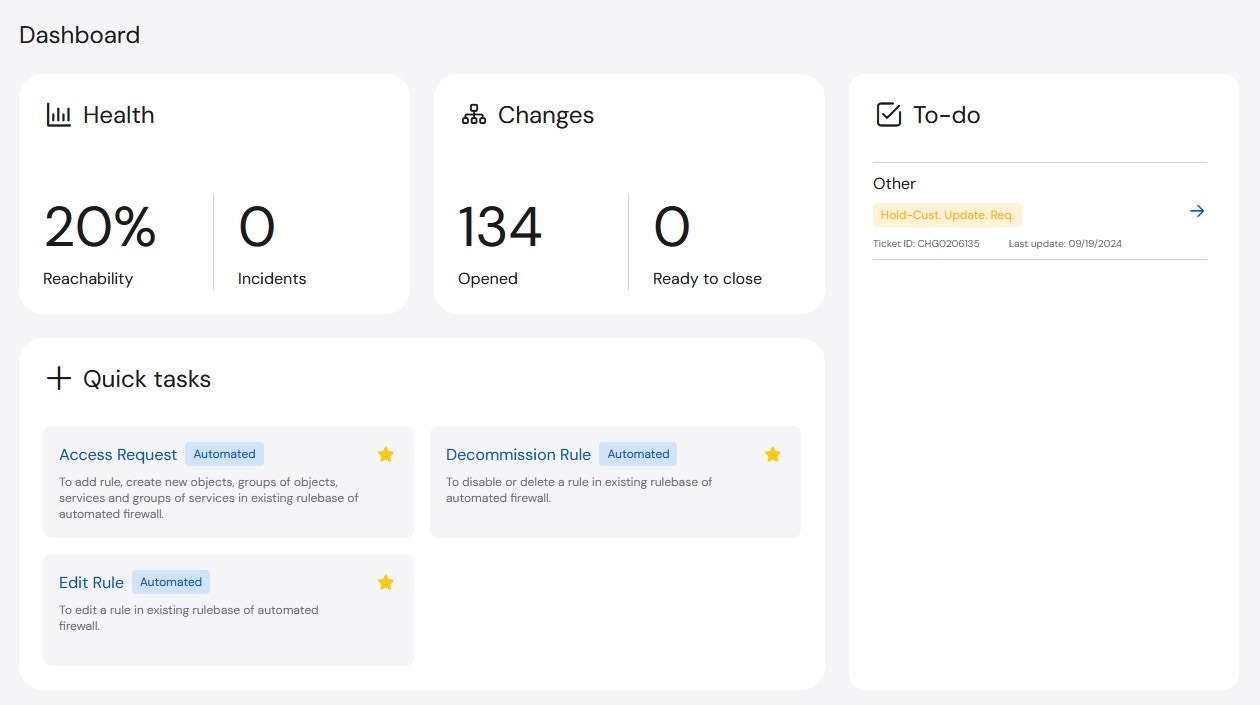
- Health: The Health widget provides information about the Reachability of all assets and the number of open Sev 1 and Sev 2 Incidents.
- Reachability: The Reachability widget measures how many assets are reachable and displays the value as a percentage of the whole. For example, if there are five devices and four are reachable, there is 80% Reachability.
- Incidents: The Incidents widget shows the number of open Sev1 and Sev2 Incidents.
- Changes: The Changes widget provides a summary for all Open and Ready to Close change tickets that are open across the company. Ready to Close changes are waiting for customer feedback in order to close.
- To-Do: The To-Do widget shows all outstanding Change tasks for the active user. Unlike the Changes widget, the items listed in the To-Do list are user specific, so it will only display outstanding items assigned to you (as the user who is currently logged in). You can click on the listed To-Do’s and will automatically be redirected to the open item.
- Quick Tasks: The Quick Tasks widget is on most pages of the platform and allows you to perform common tasks more easily. The tasks included in the Quick Tasks widget are Automated Access Requests, Automated Decommission Rule, and Automated Edit Rule.